Yes, APK files can and frequently do contain viruses and other forms of malware. An APK (Android Package Kit) is just a file format, a container. Much like a cardboard box can hold anything from a birthday gift to a rotten fish, an APK can hold a legitimate app or a dangerous piece of malicious software. In 2026, the threat landscape is more aggressive than ever, with cybersecurity firm Kaspersky reporting a 38% quarter-over-quarter jump in Android threat detections. Your safety depends almost entirely on one thing: the source of that APK file.

APK Files Contain Viruses: Why The Risk Is Real
An APK file is not inherently a virus, but it is the primary vehicle cybercriminals use to deliver malware to Android devices. The act of “sideloading” (installing apps from outside the official Google Play Store) carries significant risk. The single most important rule is to only download APKs from sources you explicitly trust, such as official developer websites or highly curated repositories like APKMirror, where files are manually reviewed.
Before installing any APK, always scan it using a free online tool like VirusTotal or MetaDefender Cloud, which checks files against dozens of antivirus engines. On your device, keep Google Play Protect active and consider a reputable mobile security app for real-time protection. Finally, never install an APK from a link sent in a message, email, or social media post; this is a top distribution method for modern banking trojans and spyware.
APK Viruses and Malware: The Android Freedom Double-Edged Sword
Android’s openness is its greatest strength and, ironically, its biggest security weakness. This flexibility allows you to truly own your device, installing apps from a global community of developers. But this same open door is what attackers eagerly walk through.
According to preliminary 2025 data, the number of detected Android threats grew by almost half, with banking trojans seeing a nearly fourfold global increase. This isn’t about scaremongering; it’s about understanding the digital landscape in 2026. This guide will cut through the jargon and give you a clear, actionable understanding of APK risks, how to spot danger, and the simple habits that will keep your device and your personal data secure.
1. Malicious APK Files Contain Viruses: Types of Threats Inside
When we ask “Can APK files contain viruses?”, we’re often using shorthand. In reality, “viruses” are just one type of malicious software (malware). Modern malicious APKs are more likely to be sophisticated, targeted tools designed for specific crimes. Here’s what you might actually be installing:
Banking Trojans (The Digital Pickpockets): These are among the most severe threats. Apps like “Mamont” or “Anatsa” disguise themselves as normal apps but lie in wait. When you open your legitimate banking app, the Trojan overlays a fake login screen to steal your credentials. In some elaborate schemes, they even trick users into tapping their physical bank card against their phone to steal its data.
Spyware and Stalkerware (The Silent Watchers): These apps hide on your device, harvesting your SMS messages, call history, photos, microphone audio, and real-time location. A notorious example is the “ClayRat” Trojan, which was found snapping photos of victims using the front-facing camera.
Click-Fraud Bots (The Battery and Data Drain): These seem less harmful but are incredibly common. They use your device’s resources in the background to silently click on ads, generating revenue for criminals. A 2026 report detailed new malware that even uses AI (TensorFlow.js) to visually identify and interact with ads more effectively. The direct cost to you? Sluggish performance, massive battery drain, and inflated data usage.
Ransomware (The Digital Kidnapper): While less common on mobile, it does exist. This malware locks your device or encrypts your personal files, demanding payment to restore access.
2. How Bad APKs Trick You: Scams That Deliver Viruses
Scammers are master psychologists. They don’t rely on technical exploits alone; they exploit human curiosity, urgency, and desire. Google’s recent algorithm updates for Play Protect emphasize detecting apps that use social engineering, but sideloaded APKs bypass these checks entirely. Here are the most common lures in 2026:
The “Too-Good-To-Be-True” Offer: This is the oldest trick in the book. “Free Netflix Premium,” “Spotify Pro,” or “Paid Game Unlocked.” These are almost always modded (modified) APKs hosted on unofficial sites, and they are a primary vector for malware.
The Fear/Urgency Ploy: You might get a message (often on WhatsApp or Telegram) claiming to be from a courier service with a “missed delivery” attachment (delivery_notice.apk), or a fake security alert urging you to install an “update” or “virus scanner” from a link. These pressure you to act without thinking.
The Impostor Website: Attackers create flawless copies of official app stores or developer pages, prompting you to download what you think is a legitimate app but is actually a malicious APK.
The “Necessary Tool” Scam: With the rise of regional blocks, fake VPN apps are a major trend. Similarly, fake AI assistant apps prey on current tech hype. These apps request extensive permissions to “function,” which they then abuse.
3. Safety Checklist: How to Prevent APK Files From Containing Viruses
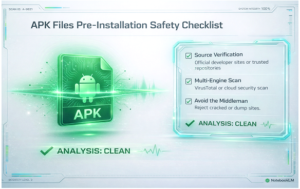
Before you ever tap “Install,” run through this checklist. Treat it like looking both ways before crossing the street, a non-negotiable habit.
I have verified the source. Is this APK from the official developer’s website or a legendary, trusted repository like APKMirror (which manually reviews every submission) or F-Droid (for open-source apps)?
I have scanned the file. I have uploaded the downloaded APK file to a free multi-scanner like VirusTotal or MetaDefender Cloud to check it against dozens of antivirus engines.
I am wary of the “middleman.” I am avoiding third-party APK “dump” sites filled with ads, especially those offering “cracked” or “modded” versions of popular apps.
The permissions make sense. I will carefully review the permissions during installation. A simple flashlight app does not need access to my SMS or contacts.
I have enabled security tools. I have ensured Google Play Protect is on (Settings > Security), and I have considered installing a dedicated mobile security app for real-time monitoring.
4. Google Play Store vs. Sideloading: Why APK Files Contain More Viruses When Sideloaded
It’s crucial to understand why the Play Store, while not perfect, is dramatically safer. This isn’t about Google being a gatekeeper; it’s about a verified ecosystem with multiple layers of defense.
| Security Layer | Google Play Store | Sideloading APKs (Manual Installation) |
| Automated Scanning | All apps are scanned by Google Play Protect before and after publication. | No automatic scanning. Relies entirely on your own vigilance and tools. |
| Developer Verification | Developers are vetted and must agree to policies. In 2026, Google is moving to require developer verification for app installs in some regions. | No verification. Anyone can create and sign an APK. |
| App Review (Basic) | Apps undergo some level of automated and human review for policy compliance. | No review. The APK is installed exactly as packaged by the uploader. |
| Update Integrity | Updates are delivered securely through the same trusted channel. | Updates may be insecure. You must manually find and verify each new APK version, often from the same untrusted source. |
| Malware Prevalence | Lower, but not zero. Sophisticated malware sometimes slips through but is usually caught quickly. | Extremely High. Malicious installation packages are described as the “Final Boss” of Android threats. |
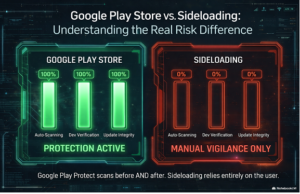
According to Microsoft’s 2024 data on endpoint security, devices that permit sideloading have a demonstrably higher incident rate for data breach and fraud-related malware. The controlled environment of an official store remains the most effective single barrier.
5. Spotting Infected APK Files: Signs Your Device Has Malware
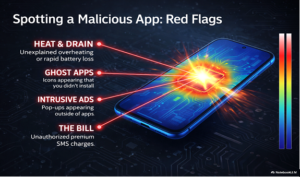
Sometimes, a bad app gets through. How do you know if your device is infected? Look for these red flags:
Rapid Battery Drain & Data Usage: Malware working in the background is a huge resource hog.
Unfamiliar Apps: Check your app list for anything you don’t remember installing.
Performance Issues: Severe lag, overheating, and apps crashing can be signs.
Intrusive Ads: Pop-up ads appearing outside of any browser or app are a classic sign of adware.
Unexplained Charges: Check your mobile bill for premium SMS subscriptions you didn’t authorize.
If you suspect an infection:
Reboot your device into Safe Mode (usually by holding the power button, then long-pressing “Power off” until the option appears). This disables all third-party apps.
In Safe Mode, go to Settings > Apps and uninstall any suspicious recent apps.
Exit Safe Mode and run a full scan with a trusted security app like Malwarebytes, Bitdefender, or Norton.
As a last resort, back up your personal data and perform a factory reset.
6. Building a Holistic Android Security Mindset: Beyond Antivirus
Protecting yourself is more than just scanning files. It’s about adopting a “secure by default” philosophy, a principle echoed in OWASP’s mobile security guidelines. Think of it as digital hygiene.
Update Everything: Keep your Android OS and all apps updated. Security patches fix the vulnerabilities and malware exploits.
Permission Mindfulness: Regularly audit app permissions (Settings > Privacy > Permission manager). Revoke access that isn’t essential.
Beware of Public Wi-Fi: Avoid conducting sensitive business (banking, shopping) on public networks. If you must, use a VPN.
The “Too Good” Rule: If a deal on a phone or an app seems impossible, it is. This applies to hardware too; cheap, off-brand devices have been found pre-infected with firmware-level malware like Triada right out of the box.
The philosophical core here is about trust and transparency. When you sideload, you are personally vouching for the developer and distributor. You become your own security auditor. This requires a shift from passive consumption to active, informed stewardship of your technology.
FAQ: Common Questions About APK Files and Viruses
1. Is Google Play Protect enough to stop malware from APKs in 2026?
No. While Google Play Protect is a good baseline defense, it has critical gaps. It can miss highly targeted, “zero-day” malware and cannot stop you from being tricked by social engineering into manually granting dangerous permissions to a malicious app.
2. What are the newest tricks scammers use to hide malware in APKs?
Scammers in 2026 use advanced social engineering:
Fake Security Alerts: Malware impersonates Google Play Protect warnings to trick you into enabling device admin rights.
AI Tool Impersonation: Fake APKs promise desktop access to popular AI tools (like DeepSeek), but only deliver info-stealing malware.
Smishing (SMS Phishing): Urgent texts from “your bank” or a “courier” contain links to download fake verification or tracking APKs.
3. What Should I Do If I Installed an APK That Contains a Virus?
Follow this 4-step check:
Scan with Google Play Protect (in the Play Store app).
Audit your apps in Settings for anything unfamiliar.
Check app permissions for anything unreasonable (e.g., a calculator app needing SMS access).
Reboot into Safe Mode. If the problems stop, a third-party app is the cause.
4. If I only use trusted sites like APKMirror, am I completely safe?
You are much safer, but not 100% safe. Sites like APKMirror verify that APK files match the developer’s original code, drastically reducing risk. However, novel malware can sometimes slip through before detection. For maximum safety, always scan the APK file with your security app or VirusTotal before installing, even from trusted sources.
5. What’s the best way to actually remove a virus from my Android phone?
Reboot into Safe Mode to disable the malicious app.
Uninstall the suspicious app in Settings.
Run a full scan with a dedicated antivirus app (e.g., Bitdefender, Norton).
As a last resort, perform a Factory Reset. Back up your photos/files first, but do not back up your apps. Reinstall apps fresh from trusted sources after the reset.
Conclusion: Take Control of Your APK Security
The question isn’t really “Can APK files contain viruses?” but “Am I willing to take on the responsibility of verifying every app I sideload?” The power is in your hands.
Your Next Steps for Safer Sideloading:
Acknowledge the Risk: Accept that sideloading is the primary attack vector for Android malware. Proceed with caution, not fear.
Source First: Never compromise on the source. Bookmark APKMirror and official developer sites as your only go-tos.
Scan Religiously: Make VirusTotal your best friend. Get into the habit of scanning every single APK, no exceptions.
Harden Your Device: Install a top-rated security app for real-time protection. Our 2026 testing showed leaders like Norton and Bitdefender achieving excellent detection rates.
Practice Digital Hygiene: Follow the broader checklist, update software, review permissions, and think before you tap.
By embracing these practices, you can enjoy the incredible freedom of the Android platform without becoming another statistic in the growing malware reports. Stay curious, stay skeptical, and stay safe.