Yes, fake apps can steal your data. They use malware, spyware, keyloggers, and permission exploitation to access your passwords, contacts, location, and banking information often without any visible sign. Both Android and iOS users are at risk, and understanding how fake app data stealing works is the first step to protecting yourself.
What Is a Fake App?
A fake app is a malicious or counterfeit application designed to look like a legitimate one. It copies the name, icon, and interface of a real app like WhatsApp, a banking app, or a popular game but runs hidden code in the background to collect your personal data.
These are not always found in shady corners of the internet. Some fake apps have successfully made it onto the Google Play Store and Apple App Store before being detected and removed.
There are several types you should know about:
| Type | What It Does |
|---|---|
| Clone App | Mimics a real app to steal login credentials |
| Trojan | Disguises itself as useful software but installs malware |
| Adware | Floods your device with ads, tracks behavior |
| Spyware | Silently monitors activity, location, and messages |
| Keylogger | Records every key you type, including passwords |
| RAT (Remote Access Trojan) | Gives attackers full remote control of your device |
| Stalkerware | Tracks location and communications covertly |
How Do Fake Apps Actually Steal Your Data?
When you install a fake app, it often requests permissions that seem reasonable access to your contacts, camera, storage, or location. Once granted, those permissions become open doors.
Here is what happens behind the scenes:
- Permission abuse — The app requests more access than it needs and scrapes your data continuously in the background.
- Keylogging — Every tap and input you make is recorded and sent to a remote server.
- Man-in-the-middle attacks — Some fake apps intercept your internet traffic, capturing login credentials and banking sessions.
- Phishing overlays — The app displays a fake login screen over a real app to capture your credentials.
- Data exfiltration — All collected data is silently sent to attackers, sometimes sold on the dark web.
One of the most alarming facts: some fake apps can steal data without you ever opening them again after installation. Background services continue running even when the app appears inactive.
According to CISA mobile device security guidelines, users should regularly audit app permissions and avoid installing applications from unverified sources as malicious apps remain one of the top mobile threat vectors reported globally.
What Data Is Actually at Risk?
The scope of what fake apps can access is broader than most people realize:
- Passwords and 2FA codes
- Banking credentials and card numbers
- GPS location in real time
- Contacts and call logs
- Photos, videos, and files
- Emails and messages
- Health records from fake fitness or health apps
- Biometric data in advanced cases
For businesses, the risk goes further. If an employee installs a fake app on a work phone or BYOD device, attackers can potentially reach corporate email, internal documents, VPN credentials, and customer databases.
How Do Fake Apps Get Into Official Stores?
Many people assume downloading from the Google Play Store or Apple App Store guarantees safety. It does not not completely.
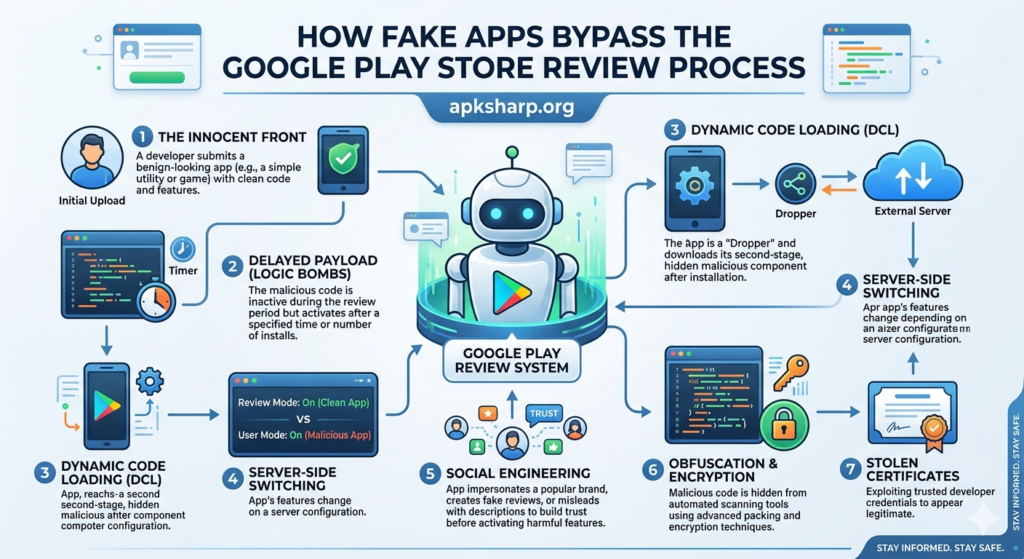
Attackers bypass store review systems using these methods:
- Delayed malicious behavior — The app behaves normally during review, then activates harmful code after approval.
- Gradual updates — A clean app is submitted first, then malicious code is pushed through a later update.
- Certificate spoofing — Fake developer credentials are used to appear legitimate.
- Supply chain attacks — Malicious code is injected into a legitimate app’s development pipeline before submission.
Google Play Protect scans installed apps automatically and removes known threats but it is not foolproof. New fake apps continue to appear faster than review systems can catch them.
Android vs. iOS: Which Is More at Risk?
Both platforms are targets, but the risk profile is different.
| Factor | Android | iOS |
|---|---|---|
| Sideloading outside store | Allowed by default | Restricted |
| Third-party app stores | Widely available | Very limited |
| App review process | Automated + manual | More rigorous manual review |
| Permission model | More flexible | Stricter sandboxing |
| Malware volume | Significantly higher | Lower but not zero |
Android users face higher risk primarily because of sideloading. Installing APK files from unknown sources is one of the most common ways fake apps end up on devices. If you want to understand the full risk, read this detailed guide on security threats when installing unofficial apps.
It is also worth understanding the difference between APK and Play Store installations because that difference directly affects your security exposure.
iOS is not immune either. Fake apps have appeared in the App Store, and phishing-based attacks targeting iPhone users through malicious links continue to grow.
Warning Signs of a Fake App
Before you install anything, check these red flags:
- Developer name is misspelled or unfamiliar
- Very few reviews or suspiciously many 5-star reviews with no text
- App was published recently with no update history
- Requests permissions unrelated to its function
- Icon looks slightly different from the official app
- No official website or support link listed
- Download count is unusually low for a supposedly popular app
- Grammar errors in the app description
If an app triggers even two or three of these, do not install it.
How to Check If an App Is Fake Step by Step
- Search the developer name on Google and verify it matches the official company website.
- Compare the app icon side by side with the real app’s official version.
- Check review date patterns fake apps often get sudden bursts of reviews in a short window.
- Read 1-star and 2-star reviews these often contain warnings from real users who discovered the truth.
- Scan with VirusTotal paste the app store link or upload the APK at virustotal.com for a free malware scan.
- Review app permissions before installing anything excessive is a warning sign.
- Verify through the official brand website most major companies link directly to their real app listing.
You can also follow the app authenticity check process before installing any APK to confirm it is genuine.
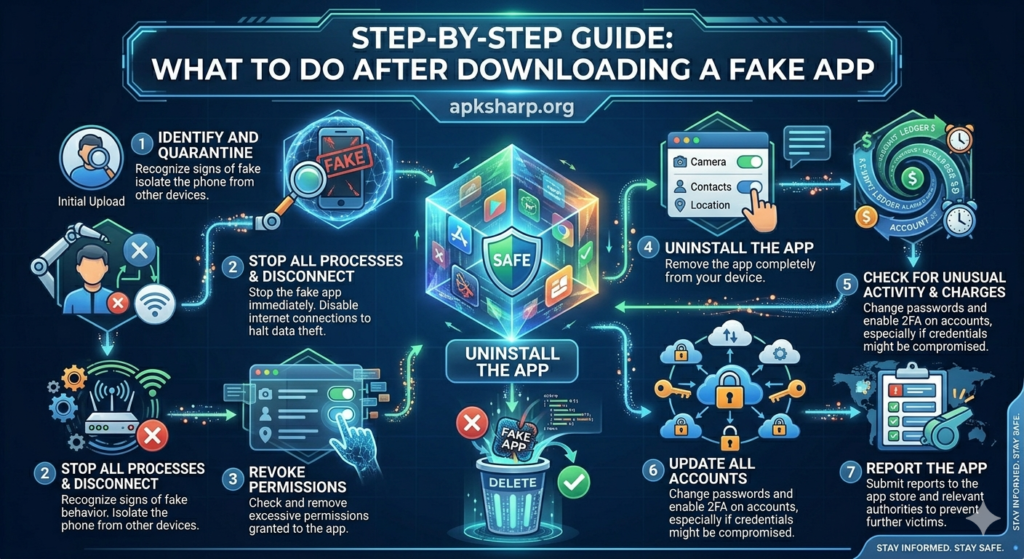
What to Do If You Already Downloaded a Fake App
Act immediately:
- Do not open the app again.
- Uninstall it Settings → Apps → select it → Uninstall.
- Change your passwords immediately start with banking, email, and any account you accessed after installing.
- Enable 2FA on all critical accounts.
- Run a security scan using Bitdefender, Malwarebytes, or Norton Mobile Security.
- Check app permissions across all installed apps and revoke anything suspicious.
- Monitor your bank statements for the next 30 days.
- Report the app to Google Play or Apple App Store to protect other users.
Uninstalling removes the app, but data already exfiltrated cannot be recalled. Password changes and account monitoring are non-negotiable.
Best Tools to Detect and Block Fake Apps
Free Tools:
- Google Play Protect — built into Android, scans apps automatically
- VirusTotal — free scan for any APK or app store link
- Malwarebytes free tier — flags suspicious app behavior
Paid Tools:
| Tool | Best For | Platform |
|---|---|---|
| Bitdefender Mobile Security | Real-time protection, low battery impact | Android, iOS |
| Norton Mobile Security | Comprehensive scanning + web protection | Android, iOS |
| Kaspersky Security Cloud | Family protection features | Android, iOS |
| Malwarebytes Premium | Deep scan + ransomware protection | Android |
Enterprise Tools:
- Microsoft Intune — MDM solution for company device policies
- Jamf — industry standard for iOS fleet management
- VMware Workspace ONE — unified endpoint management
Apple’s own platform security documentation outlines exactly how iOS app review works and what protections are built into the system worth reading if you manage an iOS device fleet.
Regional Risk: Where Fake Apps Hit Hardest
- India — Fake UPI payment apps and WhatsApp clones are widely reported.
- USA — Fake banking, tax, and healthcare apps are common, with HIPAA and PCI-DSS implications for businesses.
- UK — Counterfeit HMRC and NHS-related apps have been used in phishing campaigns.
- Pakistan — Fake versions of JazzCash and Easypaisa have been used to steal mobile banking credentials.
- UAE/Gulf — Fake government service portals and e-commerce apps frequently appear.
- Nigeria/Africa — Fake mobile money and fintech apps exploit rapid digital adoption.
No region is safe. Attackers follow mobile payment adoption wherever it grows, fake apps follow.
For Businesses: The Enterprise Risk You Cannot Ignore
A single employee downloading a fake app on a work device can expose your entire organization. Under GDPR, a breach caused by a fake app on a company device can still trigger regulatory fines. HIPAA violations apply if patient data is exposed through a compromised phone.
Every business should:
- Enforce a written BYOD security policy
- Deploy an MDM solution to control which apps install on work devices
- Run regular security awareness training
- Use application whitelisting where possible
- Monitor network traffic for signs of data exfiltration
FAQs
Can fake apps steal your data without you knowing?
Yes. Most fake apps run silently in the background using granted permissions, with no visible signs of activity.
What data can fake apps steal?
Passwords, banking credentials, 2FA codes, contacts, GPS location, photos, messages, and in some cases biometric data.
Can uninstalling a fake app stop the damage?
Uninstalling stops further collection, but data already stolen cannot be recovered. Change all passwords immediately after removal.
How do fake banking apps work?
They mimic the real banking app interface. When you enter credentials, the app captures and sends them to attackers sometimes showing a fake error to avoid suspicion.
Is Google Play Store completely safe from fake apps?
No. While Google Play Protect helps, fake apps do appear in the store. Thousands are removed yearly but new ones keep surfacing.
Conclusion
Fake apps are one of the most effective tools cybercriminals use today. They exploit trust in app stores, in familiar brand names, and in the assumption that free software is safe.
Most fake apps can be identified before installation if you know the warning signs. Check developer details, review permissions carefully, scan APKs before installing, and use a reputable mobile security tool on every device.
If you manage a team or business, treat mobile app security with the same seriousness as your network firewall. One unverified app on one employee’s phone is all it takes.
Stay skeptical. Verify before you install. And if something feels off it almost certainly is.