If you’ve ever downloaded an app outside the official store, you already know the risk. The best antivirus solutions for scanning mobile applications are no longer optional they’re the first line of defense between your device and real financial, personal, and data threats hiding inside innocent-looking apps.
Whether you’re an everyday Android user, an IT manager handling company devices, or a developer testing APK files before publishing, the right mobile antivirus tool can mean the difference between security and a silent data breach.
When an antivirus scans a mobile app, it doesn’t just check the app’s name against a blacklist. Modern mobile security tools use two core methods.
Static analysis examines the app’s code, permissions, and structure before it ever runs. The tool looks for suspicious patterns unusual permission requests, known malicious code signatures, or code attempting to access your contacts, camera, or SMS without a clear reason.
Dynamic analysis runs the app inside a controlled sandbox environment and watches what it actually does in real time. Does it silently connect to a suspicious server? Does it read files it shouldn’t? Dynamic scanning catches threats that only activate after the app launches.
Together, these two techniques are what separate a basic virus checker from a serious mobile threat defense solution. According to independent researchers at AV-TEST, the gap between basic and advanced mobile scanners is significant top tools catch up to 99.9% of known Android malware samples.
Why Mobile App Threats Are Getting Worse in 2026
Mobile malware isn’t slowing down. Threats like banking trojans (Anubis, FluBot), stalkerware, adware, and credential stealers are regularly found even in apps that passed official store review processes.
The OWASP Mobile Top 10 the cybersecurity industry’s standard threat reference lists insecure data storage, improper authentication, and insufficient cryptography as the most exploited attack vectors in mobile apps today. Every developer and IT administrator should treat this list as a mandatory checklist.
Users in regions like India, Southeast Asia, and Latin America face the highest exposure due to widespread sideloading of APK files from unofficial sources. If you regularly install APKs outside the Play Store, running a trusted antivirus scanner before installation is not optional it is essential.
The risk doesn’t stop at downloading. Even apps already installed on your device can receive silent updates that introduce malicious payloads. That’s why continuous real-time scanning matters far more than one-time manual checks.
Is Google Play Protect Enough?
Google Play Protect is built into every Android device and scans apps both before and after installation. It’s a solid baseline but it has clear limitations that most users don’t know about.
Play Protect focuses primarily on apps distributed through the official Play Store. It has noticeably weaker coverage for sideloaded APKs, third-party app stores, and newer zero-day threats not yet added to Google’s detection database.
Independent tests by AV-Comparatives consistently show that dedicated third-party antivirus tools detect significantly more threats than Play Protect alone sometimes with a 20–30% detection rate gap on newer malware families.
Think of Play Protect as your car’s standard factory alarm. A dedicated antivirus is the full GPS tracking, immobilization system, and 24/7 monitoring service on top of it.
For more information on Android security and mobile protection, visit our Technology section.
What About iPhone Users?
Here’s a point almost no article explains clearly: traditional antivirus cannot deep-scan iOS apps.
Apple’s sandboxing model prevents any app including antivirus apps from reading the internal contents of other apps. This is a deliberate architectural security decision, not a limitation to be fixed.
So what can antivirus tools actually do on iOS?
- Monitor network traffic for suspicious outbound connections
- Detect phishing websites and block malicious links
- Alert you when connected to unsecured or spoofed Wi-Fi networks
- Check whether your device has been jailbroken, which removes sandbox protections
- Scan documents and files stored in accessible folders
If you need to verify an iOS app developer authenticity before trusting an app, that’s a separate manual trust verification process antivirus tools cannot automate this on Apple devices.
For genuine deep app-level scanning, Android is where antivirus software has full power. iOS security depends more heavily on Apple’s ecosystem-level controls and the App Store review process.

Top Antivirus Solutions for Scanning Mobile Applications
Here is a clear side-by-side comparison of the leading tools across consumer and enterprise categories:
| Tool | Platform | Scanning Type | Best For | Free Tier |
|---|---|---|---|---|
| Bitdefender Mobile Security | Android, iOS | Real-time + on-demand | Consumers, families | No (trial) |
| Norton 360 Mobile | Android, iOS | Behavioral + web protection | Individual users | Limited |
| Kaspersky for Android | Android | Real-time + APK scan | Budget-conscious users | Yes |
| Lookout Security | Android, iOS | MTD + network protection | SMBs, professionals | Yes (basic) |
| Zimperium zIPS | Android, iOS | On-device ML detection | Enterprise | No |
| ESET Mobile Security | Android | Real-time + anti-theft | Power users | Yes (30 days) |
| Malwarebytes for Mobile | Android | On-demand scan | Cleanup and remediation | Yes |
| Google Play Protect | Android | Store + installed apps | Baseline protection only | Yes (built-in) |
Bitdefender and Norton consistently lead in AV-TEST mobile security evaluations for detection rate, performance impact, and usability scoring. Zimperium and Lookout are the enterprise standards, especially when deployed alongside MDM platforms like Microsoft Intune or VMware Workspace ONE.
For Developers: How to Scan Your Own APK Before Publishing
This is the use case almost no consumer security article covers and it matters enormously.
If you’re building or distributing an Android app, you need to verify that your APK is completely clean before it reaches real users. A single malware flag post-launch can permanently damage your app’s reputation and lead to immediate store removal.
Step 1 — Upload to VirusTotal
Visit VirusTotal and upload your APK file. You’ll get simultaneous scan results from over 70 antivirus engines within two minutes. It’s free, fast, and the industry-standard first check.
Step 2 — Run MobSF for Deep Analysis
MobSF (Mobile Security Framework) is an open-source tool that performs both static and dynamic analysis on Android and iOS apps. It generates a full security report covering permissions, hardcoded API keys, dangerous function calls, and more essential before any app store submission.
Step 3 — Review Permissions Manually
Use JADX or ApkTool to decompile the APK and manually verify that the permissions the app requests match what it actually needs. Understanding what an app package file contains helps you identify anything suspicious in the manifest.
Step 4 — Verify Your App Signing Certificate
A valid, consistent signing certificate proves your APK hasn’t been tampered with during distribution. Read a full guide on Android app signing to understand how this works and why it matters for security and user trust.
Step 5 — Check Against OWASP Mobile Top 10
Cross-reference your app against the OWASP Mobile Top 10 checklist. This is the standard that enterprise security teams and app store reviewers use to evaluate risk and addressing these issues before launch saves significant remediation cost later.
For structured reporting and compliance documentation, you can also use professional APK scanning services that provide certification-ready security reports.
Enterprise Mobile Security: MDM + MTD Is the Real Standard
For organizations managing employee devices, consumer antivirus is the wrong tool entirely.
Enterprise mobile security requires two integrated layers working together:
Mobile Device Management (MDM) — platforms like Microsoft Intune, Jamf, and VMware Workspace ONE control which apps can be installed on employee devices, enforce encryption policies, manage configurations, and enable remote wipe if a device is lost or stolen.
Mobile Threat Defense (MTD) — tools like Zimperium, Lookout, and CrowdStrike Falcon for Mobile sit on top of MDM to provide real-time threat detection, behavioral analysis, and network-level protection against attacks that MDM alone cannot catch.
Together, MDM + MTD covers the full attack surface: device-level threats, app-level risks, and network-based attacks. This combination is required for HIPAA, ISO 27001, GDPR, and PCI-DSS compliance in regulated industries such as healthcare, finance, and legal services.
For BYOD (Bring Your Own Device) environments specifically, MTD tools are critical because IT teams cannot control every app an employee installs on their personal phone. The solution needs to work without requiring full device control.
How to Scan an APK File for Malware (Step-by-Step)
If you’ve downloaded an APK and want to check it before installing, follow this exact process:
- Do not install it yet. Keep the file in your downloads folder and do nothing until the scan is complete.
- Upload to VirusTotal. Paste the file directly or submit its download URL for a multi-engine scan.
- Review the results. If two or more reputable engines flag the file, treat it as dangerous and delete it.
- Run your installed antivirus scanner on the file. Bitdefender, Kaspersky, and ESET all support manual APK file scanning directly from your device storage.
- Check the source. Read about security threats when installing unofficial apps and how to verify app authenticity before trusting any download source.
- Review permissions carefully before allowing installation. A flashlight app requesting access to your contacts and SMS is a serious warning sign this is how many fake apps steal your data.
- Install only if fully clean. After installation, monitor for unusual battery drain, unexpected data usage, or performance changes.
If your APK fails to install after all checks pass, that’s a separate technical issue see why APK files sometimes don’t install on Android for troubleshooting steps.
Common Mistakes People Make With Mobile Antivirus
Downloading antivirus from an unknown developer. Some apps marketed as “antivirus” or “phone cleaner” in the Play Store are themselves adware or data collectors. Only use established names: Bitdefender, Norton, Kaspersky, ESET, Malwarebytes.
Believing free is sufficient for sensitive data. Free tiers typically offer on-demand scanning only. Real-time protection which intercepts threats before they execute is almost always a paid feature.
Ignoring what permissions the antivirus requests. Your scanner is only as effective as the access you grant it. An antivirus with no file system access cannot scan your files.
Thinking iOS is immune to all threats. Apple’s closed ecosystem reduces risk significantly, but phishing through apps, malicious configuration profiles, and network-level attacks remain real threats on iPhone.
Never updating the antivirus database. Virus definitions must stay current. An app last updated 60 days ago will not detect threats discovered in the past two months.
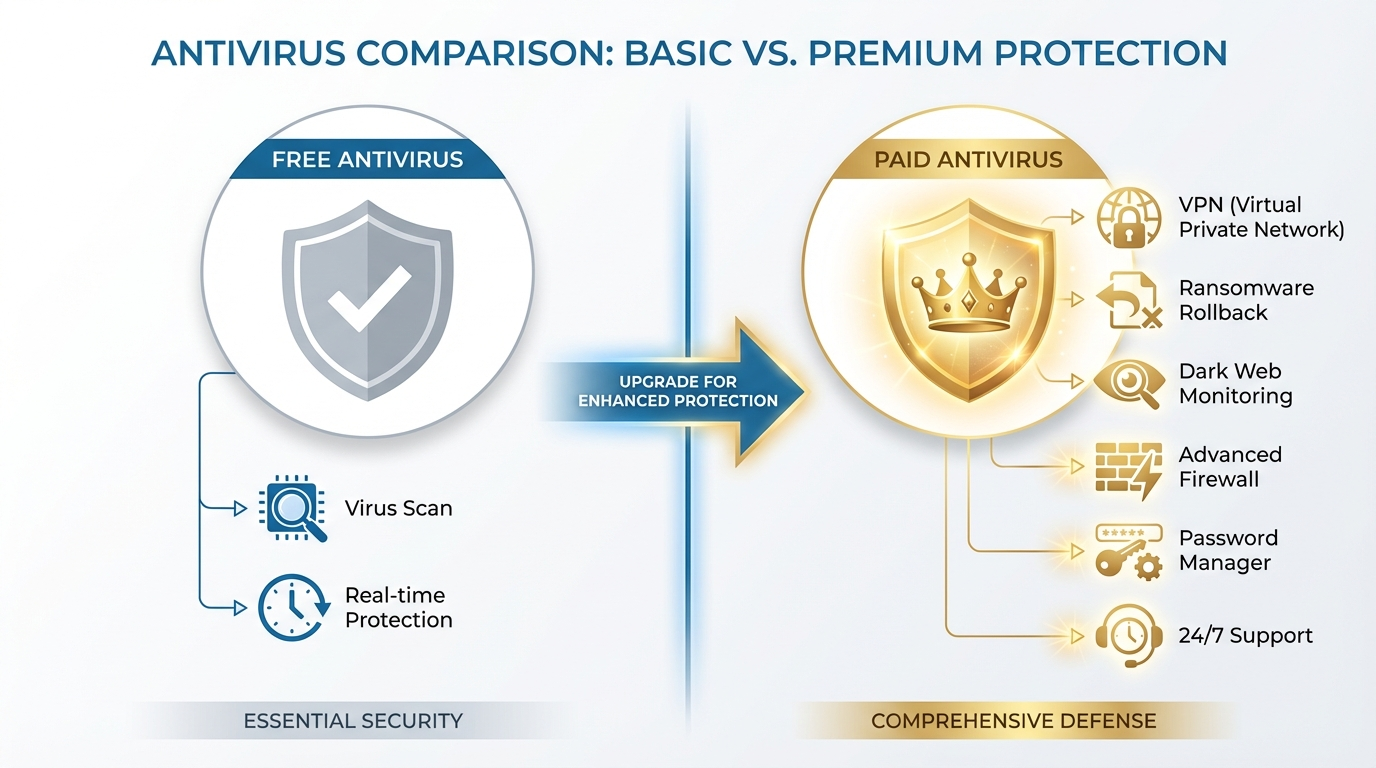
Free vs Paid Mobile Antivirus: Decision Guide
| Feature | Free | Paid |
|---|---|---|
| On-demand scanning | ✅ | ✅ |
| Real-time protection | ❌ | ✅ |
| Web and phishing protection | Limited | ✅ |
| App behavior monitoring | ❌ | ✅ |
| Anti-theft and remote wipe | ❌ | ✅ |
| VPN included | ❌ | Some plans |
| Priority customer support | ❌ | ✅ |
| Best for | Light, low-risk users | Anyone with banking apps or sensitive data |
If you store banking apps, work emails, or personal documents on your phone, the paid tier of any top-rated antivirus is worth the annual cost typically $15 to $40 per year for a single device license.
Pricing Overview (2026 Estimates)
| Tool | Free Tier | Paid (per year, 1 device) |
|---|---|---|
| Bitdefender Mobile Security | No | ~$15–$20 |
| Norton 360 for Mobile | No | ~$30–$50 |
| Kaspersky for Android | Yes (basic) | ~$12–$18 |
| Lookout | Yes (basic) | ~$30 (personal) / custom (enterprise) |
| ESET Mobile Security | 30-day trial | ~$15–$20 |
| Malwarebytes Mobile | Yes | ~$40 (premium) |
Prices are approximate and vary by region and current promotions. Enterprise per-seat pricing is quoted separately through vendor sales teams.
Conclusion
Mobile app threats in 2026 are sophisticated, persistent, and increasingly difficult to detect without the right tools in place. Whether you’re protecting a personal device, securing a fleet of corporate phones, or scanning your own APK before submitting it to an app store, there is a specific solution designed for your exact situation.
Bitdefender or Kaspersky offer the strongest combination of detection accuracy and value for everyday consumers. When shifting to the enterprise level, the professional standard involves integrating Zimperium or Lookout with an existing MDM platform. Finally, for developers, no release checklist is complete without the inclusion of VirusTotal and MobSF.
Mobile security is not a one-time setup. It requires updated tools, informed habits, and the right combination of software for your threat environment. Start scanning today — your data, your users, and your reputation all depend on it.
For more updates and guides on mobile security, visit Apksharp homepage.
FAQs
What is the best antivirus for scanning mobile applications in 2026?
Bitdefender Mobile Security and Norton 360 consistently rank highest in AV-TEST independent evaluations for detection rate, performance, and usability. For enterprise deployments, Zimperium and Lookout are the professional standards for mobile threat defense.
Can antivirus software scan apps on Android?
Yes. Android’s open architecture allows antivirus tools to scan both installed apps and APK files before installation. Bitdefender, Kaspersky, and ESET all support real-time and manual on-demand app scanning with high detection accuracy.
How do I scan an APK file for malware before installing it?
Upload the APK to VirusTotal for a free multi-engine scan, then run your installed antivirus scanner on the file. Check all permissions before proceeding and only install if the file passes both checks cleanly.
Is Google Play Protect enough to protect my Android phone?
Play Protect is a useful baseline but consistently underperforms dedicated antivirus tools in independent testing. It has limited coverage for sideloaded APKs and newer zero-day threats. A third-party scanner is strongly recommended if you install apps from outside the Play Store.
What is mobile threat defense (MTD) and how does it differ from regular antivirus?
Mobile threat defense is an enterprise-grade security layer that combines app scanning, behavioral monitoring, network threat detection, and device integrity checks. Unlike consumer antivirus, MTD integrates directly with MDM platforms like Microsoft Intune for centralized management across all employee devices.