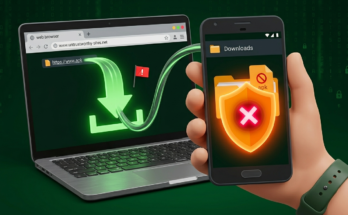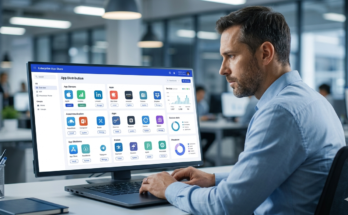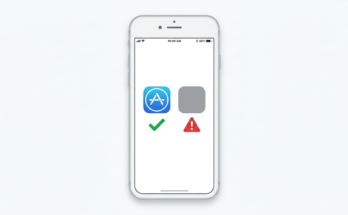
An enterprise app store is a private, organization-controlled distribution portal for deploying internal mobile apps to employees without submitting to the public Apple App Store or Google Play. It gives IT full control over which apps reach which devices, when updates deploy, and who loses access when they leave.
A public app store (Apple App Store or Google Play) is the opposite: open to billions of users, governed by platform rules, and reviewed before publish.
Why This Question Actually Matters Right Now
Here’s the thing: most teams don’t consciously choose a distribution model. They default to whatever’s easiest and pay for it later.
An IT manager at a 600-person logistics company emails an APK to field staff. Six months in, three different versions are running on different phones. One version has a security patch. One doesn’t. Nobody knows which is which.
That’s not a hypothetical. Users who’ve tried ad-hoc APK or IPA distribution via shared drives or email consistently report exactly this version fragmentation problem and it only gets worse past 50 devices.
According to Technavio’s 2024 market report, the enterprise app store market is projected to grow by USD 6.73 billion between 2024 and 2029 at a CAGR of 21.9%. The Future Market Report (2024) valued the market at USD 14.76 billion in 2024, with projections reaching USD 28.64 billion by 2033. Organizations aren’t adopting private app stores because they’re trendy. They’re adopting them because the alternative breaks.
One counter-intuitive insight worth flagging: most people assume the Apple App Store’s review process makes it more secure for enterprise use. The data says otherwise Apple’s review screens for consumer safety, not corporate data governance, BYOD compliance, or internal API exposure.
An enterprise and App Store app differ fundamentally in who controls distribution, who can download, and what review process applies. Enterprise apps bypass platform review entirely and are distributed to specific employees via MDM or a private portal. Public App Store apps go through Apple or Google’s approval pipeline and are available to anyone or anyone in a target region.
Enterprise App Store vs. Public App Store: The Real Differences
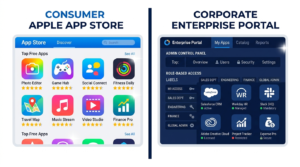
Quick Comparison: Enterprise app stores are better suited for internal tools containing sensitive business data, because they bypass public review and give IT role-based access control. Public app stores work better when you need consumer reach, payment infrastructure, or platform-enforced discoverability. The key difference is who controls distribution your IT team or Apple/Google.
| Factor | Enterprise App Store | Public App Store (Apple/Google) |
|---|---|---|
| Who Can Download | Only enrolled/authorized employees | Anyone (or regional subset) |
| Review Process | None IT deploys directly | Apple/Google review (days to weeks) |
| Sensitive Data | Yes internal APIs, employee data | No must comply with platform privacy rules |
| Update Control | IT pushes updates silently, on schedule | User must accept; App Store can delay |
| Cost | MDM/enterprise tool subscription | Developer account + 15–30% revenue cut |
| Best For | Internal tools, HR apps, field ops, logistics | Customer-facing products, consumer apps |
| Compliance | GDPR/HIPAA-friendly data stays internal | Platform terms govern data handling |
According to Appaloosa’s enterprise mobility documentation, more than 74% of companies allow or plan to allow employees to use smartphones for business. That creates a real distribution problem: internal apps can’t go on public stores without exposing proprietary business logic. The enterprise app store exists to bridge that gap keeping internal apps internal while giving employees a familiar, app-store-like experience.
The Four Main Distribution Methods and When Each One Breaks
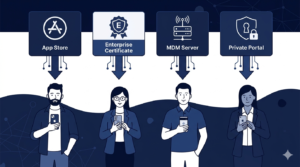
1. Public App Store (Apple App Store / Google Play)
Use this when your app is genuinely customer-facing. Works for: consumer products, external-facing tools, anything that benefits from platform discoverability.
Don’t use it for internal apps. Apple’s App Store Review Guidelines explicitly prohibit apps with no public use case they’ll reject internal-only tools.
2. Apple Developer Enterprise Program (ADEP) / Direct IPA Distribution
This is the one that burns teams. Apple’s ADEP lets you sign an IPA and distribute it outside the App Store no review required. Sounds perfect.
The catch: Apple has revoked ADEP certificates from companies distributing apps beyond employees sometimes pulling access with 24 hours’ notice. When that certificate goes, every app signed with it stops working simultaneously. No warning. No grace period.
What most guides skip is the fallback planning. If you’re using ADEP, you need a secondary distribution method ready before your certificate gets flagged not after.
Related: Android App Signing Explained: What Every Developer Must Know covers certificate management for Android distribution, including what happens when signing keys are compromised.
3. MDM-Managed Public App Distribution
You approve a public app through Apple Business Manager or Managed Google Play, then push it silently to enrolled devices. Users see only IT-approved apps. Updates happen on IT’s schedule.
This is where Microsoft Intune fits it manages app deployment across iOS and Android, handles conditional access policies, and integrates with Azure AD for role-based app targeting. For teams already in the Microsoft ecosystem, it’s often the lowest-friction path.
4. Private Enterprise App Store
A dedicated internal portal like Appaloosa or Appcircle that hosts both in-house apps and approved public apps. Employees browse and install like they would on any app store. IT controls the catalog, manages versions, and revokes access when someone leaves.
This is the most scalable option for teams above 100 devices. It doesn’t eliminate MDM it complements it.
How to Choose: A Practical Decision Framework
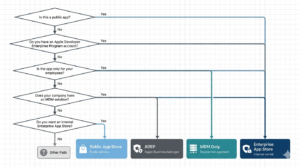
To Choose the Right App Distribution Model, Follow These Steps
- Identify who uses the app: internal employees only, or external users too?
- Check if the app contains proprietary data or internal API connections if yes, public stores are off the table.
- Count your devices: under 20, ad-hoc works; 20–100, MDM alone may suffice; 100+, dedicated enterprise app store is worth the cost.
- Assess your compliance requirements: HIPAA, GDPR, or SOC 2 obligations almost always require IT-controlled distribution.
- Evaluate update urgency: if security patches must reach all devices within 24 hours, silent push from an enterprise store is the only reliable option.
Look if you’re in a situation where you need to distribute an internal app to 200+ employees across iOS and Android, and you’re currently doing it via email attachments, here’s what actually works: stand up a basic MDM first (Intune if you’re Microsoft-heavy, Jamf for Apple-first environments), then layer an enterprise app store on top once your device enrollment is stable.
Some experts argue that for smaller companies (under 50 employees), a full enterprise app store is overkill. That’s valid for teams with simple, low-sensitivity tooling. But if your app touches HR data, financial records, or customer PII, the compliance exposure of ad-hoc distribution outweighs the setup cost even at 10 users. Or maybe I should say it this way: the question isn’t whether you can afford an enterprise app store. It’s whether you can afford the breach that informal distribution enables.
According to Apple’s official App Store Review Guidelines, apps distributed through ADEP must be used only by employees of the organization not partners, clients, or contractors. Violating this is the most common reason enterprise certificates get revoked. Teams that don’t read the fine print discover this at the worst possible time.
Security: The Part Most Distribution Guides Don’t Cover

The security picture for enterprise vs. public app distribution is more nuanced than most guides suggest. I’ve seen conflicting data some sources emphasize that public stores provide malware scanning that enterprise stores lack, while others argue that the real threat vector is the internal network exposure of enterprise apps. My read is: both risks are real, and they require different mitigations.
Public App Store: Security You Don’t Control
Apple and Google run automated and human review. That catches most obvious malware. But it doesn’t catch data exfiltration built into a legitimate-looking app and it won’t prevent employees from installing unapproved apps that access corporate data.
See also: Official vs Unofficial iOS Apps: Security Risks Explained 2026 covers how fake and clone apps slip through App Store review, and how to verify app authenticity before enterprise deployment.
Enterprise App Store: Security You Do Control
Your internal app never touches Apple’s or Google’s servers. Proprietary business logic stays behind your firewall. Role-based access means a departing employee loses app access the moment IT revokes their profile not whenever they happen to delete the app.
The trade-off: you’re now responsible for your own malware scanning and code signing integrity. Android app signing must be managed carefully a compromised signing key is catastrophic for in-house distributed apps.
The BYOD Layer
BYOD is where this gets complicated. Employees won’t accept an MDM profile on their personal phone if they fear IT can see their photos or messages. The enterprise app store solution here is containerization apps run in an isolated managed workspace. Corporate data never touches personal storage. It’s a harder sell to employees, but it’s the only approach that actually works at scale.
Related reading: Difference Between APK and Play Store: Why Millions Are Skipping It explains why sideloading APKs outside managed channels creates exactly the security exposure enterprise stores are built to prevent.
The Tools Worth Knowing: Appaloosa, Appcircle, and Microsoft Intune
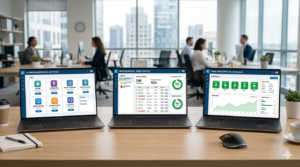
Three platforms come up consistently in real enterprise deployments each with a meaningfully different approach. The Appaloosa enterprise app store positions itself as the private portal layer: employees get a familiar storefront, IT gets role-based catalog management, and the MDM handles device-level enforcement underneath. It’s particularly strong for BYOD environments where the line between personal and corporate device is blurry.
Appcircle approaches the problem from the CI/CD side. If your mobile development team is already running automated builds, Appcircle’s enterprise app store integrates directly into that pipeline builds are signed, versioned, and deployed to the internal store without manual handoff. It’s a stronger fit for teams with active development cycles than for IT teams managing mostly third-party apps.
Microsoft Intune is the choice for organizations already running Azure AD and Microsoft 365. It’s not a standalone app store it’s an MDM that can push apps from both public stores and your own hosted packages. The user experience is less consumer-grade than Appaloosa, but the compliance reporting and conditional access integration are hard to match.
Quick note: none of these tools are mutually exclusive. A common real-world stack is Intune for device management + Appaloosa or Appcircle as the employee-facing distribution portal. Separating the distribution experience from the device policy layer gives IT more flexibility without doubling operational complexity.
Frequently Asked Questions
Q: What’s the best way to distribute an internal app to employees without using the App Store?
A: The most reliable method for 100+ employees is a private enterprise app store combined with MDM enrollment (Intune, Jamf, or similar). For smaller teams under 20 devices, Apple Business Manager with Managed Google Play handles the basics without a dedicated portal.
Q: How do I distribute an enterprise app on iOS without going through Apple review?
A: Use Apple’s Developer Enterprise Program (ADEP) for in-house IPA distribution, or Apple Business Manager to push apps through an MDM. ADEP bypasses review entirely but requires strict compliance apps must only reach actual employees of your organization, or Apple may revoke your certificate.
Q: Should I use an enterprise app store or just MDM for internal app distribution?
A: MDM handles device policy and can push apps silently. An enterprise app store adds the employee-facing catalog experience browse, self-install, version history. For large organizations, you need both. For under 50 devices with simple tooling, MDM alone often suffices.
Q: Why does my APK file keep failing to install on employee devices?
A: Most enterprise APK install failures trace back to three causes: Unknown Sources being disabled, certificate mismatch if the signing key doesn’t match a previous version, or an incompatible target SDK.
Q: When should an enterprise choose a public App Store listing over a private distribution channel?
A: Choose a public listing when the app serves external users (customers, partners, or contractors not on your MDM), when you need App Store payment infrastructure, or when discoverability in search is part of the growth strategy. If every user is an employee on a managed device, private distribution is almost always the right call.